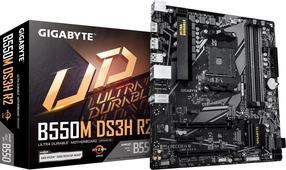
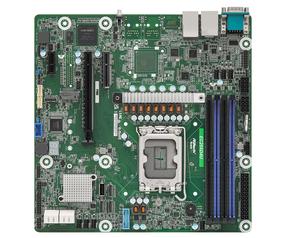
B660 DS3H DDR4 s1700 4DDR4 DP/HDMI M.2 ATX
Intel® B660 Motherboard with 6+2+1 Phases Hybrid Digital VRM with MOS Heatsink, 2 x PCIe 4.0 M.2 with Thermal Guard, 2.5GbE LAN, WIFI 6 802.11ax Rear USB 3.2 Gen 2 Type-C®, RGB FUSION 2.0, Q-Flash Plus
Supports 12th Gen Intel® Core™ Series Processors
Dual Channel Non-ECC Unbuffered DDR4, 4 DIMMs
6+2+1 Phases Hybrid Digital VRM with MOS Heatsink
WIFI 6 802.11ax 2T2R & BT5 with AERO Antenna
Fast 2.5 GbE LAN with Bandwidth Management
Dual Ultra-Fast NVMe PCIe 4.0 x4 M.2 with Thermal Guard
Rear SuperSpeed USB 3.2 Gen 2 TYPE-C® for Fast and Versatile Connections
High Quality Audio Capacitors and Audio Noise Guard
RGB FUSION 2.0 supports Addressable LED & RGB LED Strips
Smart Fan 6 Features Multiple Temperature Sensors , Hybrid Fan Headers with FAN STOP
Q-Flash Plus Update BIOS without Installing the CPU, Memory and Graphics Card
Cleaner and more efficient power delivery to the CPU with better thermal performance ensure stability under high CPU frequencies and heavy loading.
6+2+1 Phases Low RDS(on) MOSFETs
Solid capacitors to improve transient response and minimize oscillation
8-pin Solid Pin CPU Power Connector
M.2 Thermal Guard
GIGABYTE Ultra-Efficient M.2 Thermal Guard
With durability in mind, GIGABYTE provides a thermal solution for M.2 SSD devices. The M.2 Thermal Guard prevents throttling and bottlenecks from high speed M.2 SSDs as it helps to dissipate heat before it becomes an issue.
First adopter on 2.5 GbE LAN onboard
2X Faster than ever
Adoption of 2.5G LAN provide up to 2.5 GbE network connectivity, with at least 2 times faster transfer speeds compared to general 1 GbE networking, perfectly designed for gamers with ultimate online gaming experience.
Support Multi-Gig(10/100/1000/2500Mbps) RJ-45 Ethernet
Q-Flash Plus
Update the BIOS easily without installing the CPU, memory and graphics card.
With GIGABYTE Q-Flash Plus, you don’t need to install the CPU, memory and graphics card nor enter the BIOS menu to flash the BIOS. Just download and save a new BIOS file (rename to gigabyte.bin) on the USB flash drive, then press the dedicated Q-Flash Plus button and you’re good to go!