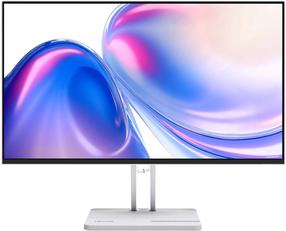
Monitor 23.8 inch 241E2FD IPS DVI HDMI
Experience true colour, unconstrained visuals
The new Philips E line monitor with 4-sides narrow border and cable management design offers a stylish enhancement to your workspace. Experience crisp Full HD visuals, 1 ms and Sync technology for smooth gaming action.
4-sided frameless display
Extremely minimising 4 sided bezels on this virtually frameless display give a minimalist look and offer an expansive viewing experience. Expands your productivity and makes you focus on the vivid images with seamless visions. Significant wide view without distraction and even multi monitor set-up in pivot mode.
IPS LED wide view technology for image and colour accuracy
IPS displays use an advanced technology that gives you extra-wide viewing angles of 178/178 degrees, making it possible to view the display from almost any angle. Unlike standard TN panels, IPS displays give you remarkably crisp images with vivid colours, making them ideal not only for Photos, movies and web browsing, but also for professional applications that demand colour accuracy and consistent brightness at all times.
1 ms (MPRT) fast response for crisp images and smooth gameplay
MPRT (motion picture response time) is a more intuitive way to describe response time, which directly refers to the duration between seeing blurry noise and clean, crisp images. The Philips gaming monitor with 1 ms MPRT effectively eliminates smearing and motion blur and delivers sharper and more precise visuals to enhance your gaming experience. The best choice for playing thrilling and twitch-sensitive games.
SmartImage game mode optimised for gamers
The new Philips gaming display has quick-access OSD fine-tuned for gamers, offering you multiple options. "FPS" mode (First person shooting) improves dark themes in games, allowing you to see hidden objects in dark areas. "Racing" mode adapts the display with the fastest response time and high colour, along with image adjustments. "RTS" mode (Real-time strategy) has a special SmartFrame mode that enables highlighting of specific area and allows for size and image adjustments. Gamer 1 and Gamer 2 enable you to save personal customised settings based on different games, ensuring best performance.
Less eye fatigue with Flicker-Free technology
Due to the way brightness is controlled on LED-backlit screens, some users experience flicker on their screen which causes eye fatigue. Philips Flicker-Free technology applies a new solution to regulate brightness and reduce flicker for more comfortable viewing.
LowBlue Mode for easy-on-the-eyes productivity
Studies have shown that just as ultra-violet rays can cause eye damage, shortwave-length blue light rays from LED displays can cause eye damage and affect vision over time. Developed for wellbeing, the Philips LowBlue Mode setting uses a smart software technology to reduce harmful shortwave blue light.
Cable management reduces cable clutter for a neat workspace
Cable management is an intimate design that maintains a tidy workspace by organising the cables and wires required for the operation of a display device.
EasySelect menu toggle key for quick on-screen menu access
The discreetly placed EasySelect Menu Toggle Key allows you to make quick and easy adjustments to monitor settings in the On-Screen Display menu.
SmartContrast for rich black details
SmartContrast is a Philips technology that analyses the contents you are displaying, automatically adjusting colours and controlling backlight intensity to dynamically enhance contrast for the best digital images and videos or when playing games where dark hues are displayed. When Economy mode is selected, contrast is adjusted and backlighting fine-tuned for just-right display of everyday office applications and lower power consumption.