Prekės informacija
Prekės aprašymas anglų kalba:
Sustainable productivity
with an energy-efficient LED display
- S Line
- 22" (55.9 cm)
- 1680 x 1050 (WSXGA)
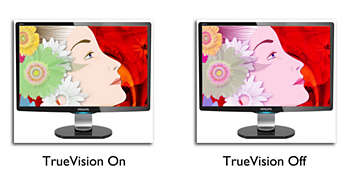
TrueVision ensures lab quality images
TrueVision is a proprietary Philips technology that uses an advanced algorithm for testing and aligning monitor display, which gives you the ultimate display performance. Philips ensures that TrueVision monitors leave the factory fine-tuned with this process giving you consistent colour and picture quality.
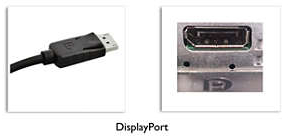
DisplayPort connection for maximum visuals
DisplayPort is a digital link from PC to monitor without any conversion. With higher capabilities than DVI standard, it is fully capable to support up to 15 metre cables and 10.8 Gbps/sec data transfer. With this high performance and zero latency, you get the fastest imaging and refresh rates — making DisplayPort the best choice for not only general office or home use, but also for the more demanding gaming and films, video editing and more. It also keeps interoperability in mind via the use of various adapters.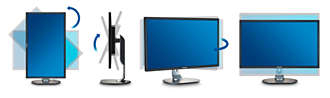 SmartErgoBase enables user-friendly ergonomic adjustments
The SmartErgoBase is a monitor base that delivers ergonomic display comfort and provides cable management. The user-friendly height, swivel, tilt and rotation angle adjustments of the base allow the monitor to be positioned for maximum comfort to help ease the physical strains of a long workday. In addition, cable management reduces cable clutter and keeps the workspace neat and professional.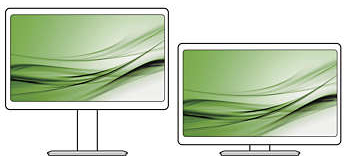
Low bezel-to-table height for maximum reading comfort
Thanks to its advanced SmartErgoBase, the Philips monitor can be lowered down almost to desk level for a comfortable viewing angle. Low bezel-to-table height is the perfect solution if you use bifocals, trifocals or progressive lens glasses for your computing work. Additionally, it allows users of different heights to use the monitor at their preferred angle and height settings, helping them to reduce fatigue and strain.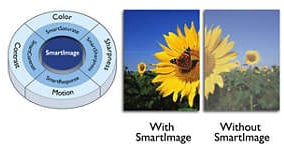 SmartImage presets for easy optimised image settings
SmartImage is an exclusive leading edge Philips technology that analyses the content displayed on your screen and optimises your display performance. This user-friendly interface allows you to select various modes, like Office, Photo, Movie, Game, Economy etc., to fit the application in use. Based on the selection, SmartImage dynamically optimises the contrast, colour saturation and sharpness of images and videos for ultimate display performance. The Economy mode option offers you major power savings. All in real time at the touch of a single button!
SmartPower: Up to 50% power saving
SmartPower is an artificial intelligent technology which dynamically analyses the content of the screen image to achieve power saving. The backlight intensity can be controlled automatically and pre-set by the system to reduce the power consumption by up to 50%, which saves substantially on energy costs
100% recyclable packaging
"Philips is committed to using sustainable, eco-friendly materials across its monitor range. All body plastic parts, metal chassis parts and packing materials use 100% recyclable materials. In some selected models we utilise up to 65% post-consumer recycled plastics. Strict adherence to RoHS standards ensures substantial reduction or elimination of toxic substances like lead, for example. Mercury content in monitors with CCFL backlights has been reduced significantly and eliminated completely in monitors with LED backlights. Visit Philips at to learn more.
Zero mercury content
Philips monitors with LED backlighting are free from Mercury, one of the most toxic natural substances, which affects humans and animals. This reduces the environmental impact of the display throughout its lifecycle, from manufacturing to disposal.
PVC-BFR free housing
This Philips monitor housing is free from brominated flame retardant and polyvinyl chloride (PVC-BFR free)
LED technology ensures natural colours
White LED's are solid state devices which light up to full, consistent brightness faster saving startup time. LED's are free from mercury content, which allows for eco-friendly recycling and disposal process. LED's allow for better dimming control of the LCD backlight, resulting in a super high contrast ratio. It also gives superior colour reproduction thanks to consistent brightness across the screen.
SmartControl for easy performance tuning
PC software for fine tuning display performance and settings. Philips offers users two choices for display setting adjustment. Either navigate the multi-level On-Screen Display menu through buttons on the display itself or use the Philips SmartControl software to easily adjust the various display settings in a familiar way
Lankytojai taip pat pirko
Belaidė žaidimų klaviatūra Savio Phenix Gateron Red Pro, Anglų (US), white pudding sp.
Įprasta kaina

TOP prekė
TOP prekė
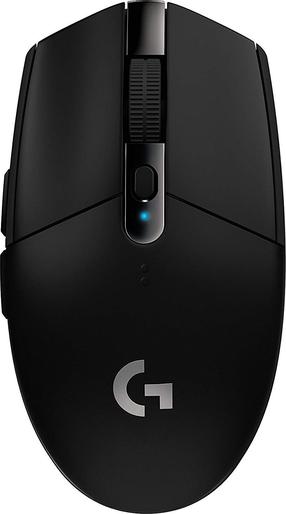
Belaidė žaidimų pelė Logitech G305 Hero Lightspeed 910-005282, 2.4ghz / usb, juoda sp.
Įprasta kaina

Belaidė žaidimų klaviatūra White Shark Premium Line Kaiken GK-003111 Red, Anglų (US), juoda sp.
Įprasta kaina